


Business Efficiency Audit with AI: Find Bottlenecks Before You Automate
Buying another AI tool won’t fix a workflow no one has mapped. A business efficiency audit ai assessment starts with how work actually moves: where repetitive tasks consume staff time, where handoffs slow progress, and whether customer requests stall before follow-up.
If your business already uses several tools but no one can explain how they connect, the problem may not be a lack of software. Friction often hides between steps. Automating a poorly understood process can make it move faster without making it work better.
This article explains how to map workflows, identify and rank bottlenecks, and decide which tasks may suit AI and which need human judgment. You’ll also learn what to measure to see whether a change helps. The examples apply to businesses in St. Louis, St. Charles, St. Peters, Florissant, Hazelwood, Ferguson, and Chesterfield, where day-to-day processes can differ from one business to another. We’ll move from workflow mapping and lead-flow review to practical next steps, including when an AI System Diagnostic may help clarify opportunities in your digital infrastructure.
Key Takeaways
- A business efficiency audit ai should uncover how work really moves before you choose what to automate.
- Map each workflow as it happens, including handoffs, exceptions, and manual workarounds, to find where delays begin.
- Choose between simplifying a process, rules-based automation, AI assistance, or human ownership based on the task’s inputs, exceptions, and risk.
- Rank audit findings by impact, frequency, effort, risk, and evidence, then track a relevant measure to assess whether a change helps.
- Once you understand your workflow gaps, consider whether an AI System Diagnostic could help evaluate your digital infrastructure and automation opportunities.
What an AI business efficiency audit examines, and why it starts with workflow
A business efficiency audit isn’t a shopping list of AI tools. It’s a structured review of how work moves through your business, which tools support it, where handoffs slow it down, and what evidence shows that friction is costing time or creating errors.
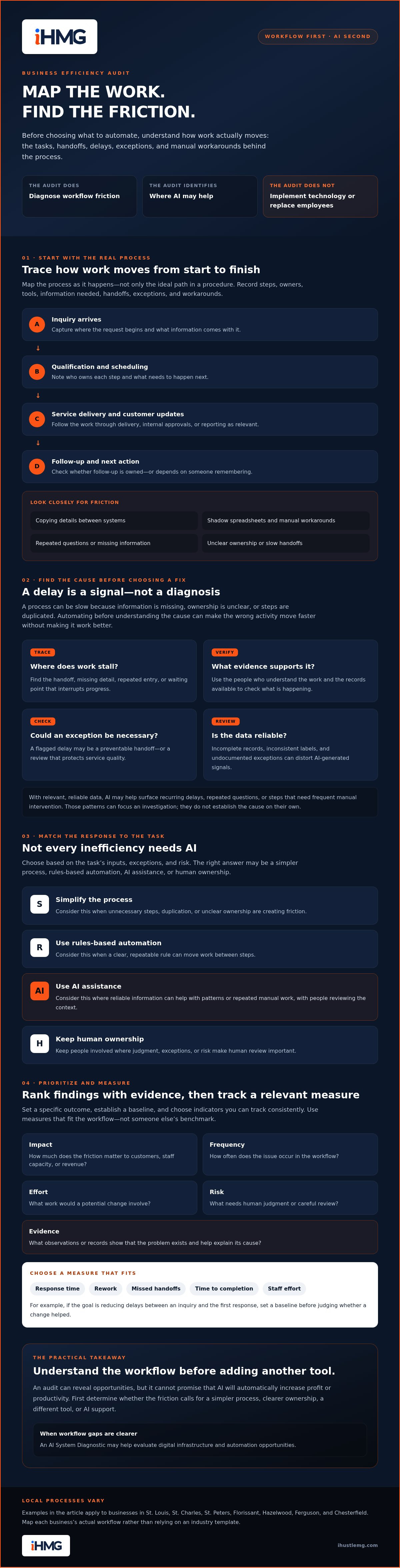
An AI business efficiency audit diagnoses workflow friction and identifies where AI may help. It does not, by itself, implement technology or replace employees. A process can be slow because information is missing, ownership is unclear, or steps are duplicated. Adding AI before understanding the cause can simply speed up the wrong activity.
This approach draws on Business process management, which focuses on discovering, analyzing, measuring, and improving processes. For a service business, trace the work from the first inquiry through qualification, scheduling, delivery, and follow-up. If a lead arrives but no one assigns it, for example, investigate the handoff before assuming a new tool is needed.
Which business workflows belong in the audit?
Start with recurring processes that affect customers, staff capacity, or revenue. For each one, record the steps, owner, tools, and information needed to move work forward. Include exceptions and workarounds, not just the ideal path written in a procedure.
- Inquiry handling, qualification, and scheduling
- Service delivery, customer updates, and follow-up
- Reporting, data entry, and internal approvals
Look for signs of friction: copying details between systems, maintaining shadow spreadsheets, asking customers the same questions twice, or chasing a task because no one knows who owns the next step.
For example, a home service business in the St. Louis area might trace a request from an online inquiry to job scheduling and post-service follow-up. The map could show staff re-entering customer details before dispatch. A business in St. Charles, St. Peters, Florissant, Hazelwood, Ferguson, or Chesterfield may have a different workflow and bottleneck. Map the process as it actually operates instead of relying on an industry template.
What AI can, and cannot, tell you about efficiency
With relevant, reliable data, AI may help surface patterns such as recurring delays, repeated questions, or steps that need frequent manual intervention. These signals can focus an investigation, but they don’t establish the cause on their own.
Context matters. Incomplete records, inconsistent labels, or undocumented exceptions can distort the picture, so people who understand the work should review AI-generated insights. A flagged delay might point to a preventable handoff, or to a necessary review that protects service quality.
Measure the process before deciding what to change. An audit can reveal opportunities, but it can’t promise that AI will automatically increase profit or productivity. Determine whether the friction calls for a simpler process, clearer ownership, a different tool, or AI support.
How to assess workflows, lead flow, and tools in an AI efficiency audit
Make the audit repeatable. Start with a specific outcome, such as reducing delays between an inquiry and the first response. Then map the workflow, gather evidence, locate friction, and check what is causing it. Don’t jump from “this feels slow” to “we need AI.” Delays may come from unclear ownership, missing information, or unnecessary steps.
Set a baseline before judging whether the process has improved. Choose indicators that fit the workflow, such as response time, rework, missed handoffs, time to completion, or staff effort. Use measures you can track consistently, rather than treating someone else’s benchmark as your target.
Map the customer and lead journey before choosing AI
Trace an inquiry from discovery to response, qualification, conversation, and next action. At each step, note who owns it, what information they need, and how the work reaches the next person or tool. Mark where context gets lost, ownership changes without acknowledgment, or follow-up depends on someone remembering.
For instance, a request may arrive through a form, be copied into a customer record, and then wait for a team member to assign it. That sequence shows where to investigate, but doesn’t prove that automation is the answer. For more context on structuring this part of the lead journey, see automated lead qualification in St. Louis.
Collect useful evidence without creating a data project
Start with what’s already available: process notes, calendars, CRM records, forms, and staff observations. Ask the people doing the work where tasks pause, get repeated, or require a workaround. Compare what they report with the records. A timestamp may show when a request was logged, but not when someone actually began handling it.
Check that records use consistent definitions and timestamps before comparing stages or periods. If they don’t, note the limitation and use interviews or direct observation to clarify the picture. Collect only information relevant to the audit question. Unnecessary sensitive details add risk without improving the diagnosis.
AI may help identify patterns in suitable process data, such as recurring delays or rework. The role of AI and automation in BPM includes analysis that can support process understanding, but the results still need context and human review. Treat an AI-generated signal as a lead to investigate, not a conclusion.
That’s the practical value of a “business efficiency audit ai” approach: connect observations to evidence before deciding what to change. Once the workflow and baseline are clear, an AI System Diagnostic may be a next step for evaluating existing digital infrastructure and automation opportunities.
Which inefficiencies should AI address, and which need a simpler fix?
An audit shouldn’t assume that every bottleneck needs new software, a workflow rebuild, or AI. The right intervention depends on the work: how stable and repeatable it is, whether inputs are clear, how often exceptions occur, what an error could affect, and how much human judgment the task requires.
Use those factors to compare four options: simplify unnecessary steps, apply rules-based automation to predictable tasks, use AI assistance where inputs or outputs require interpretation, or keep a person accountable for decisions that need judgment. A business efficiency audit ai is useful when it helps you choose among these options, not when it treats AI as the default answer.
Match the problem to the intervention
The examples below are illustrative, not client results. Use them as prompts for reviewing your own process.
- Problem signal: Staff collect the same information more than once. Possible intervention: Simplify the form or remove duplicate steps. Human checkpoint: Confirm required details are still captured.
- Problem signal: A complete request always follows the same routing rule. Possible intervention: Rules-based automation. Human checkpoint: Review exceptions and misrouted requests.
- Problem signal: Incoming messages vary in wording but need to be sorted into clear categories. Possible intervention: AI assistance to suggest a category. Human checkpoint: Verify the classification before consequential action.
- Problem signal: A decision depends on nuanced context or carries a high error impact. Possible intervention: Retain human ownership, using AI only as support if appropriate. Human checkpoint: A qualified person makes the decision.
As MIT Sloan Management Review’s Reshaping Business With Artificial Intelligence underscores, realizing value from AI requires more than adopting a tool. The practical question is whether the process and decision are suitable for it.
Know when AI is not the first move
Pause if ownership is unclear, procedures vary from person to person, required information is often missing, or requirements change frequently. These are reasons to clarify the workflow before choosing technology. Automating inconsistent inputs can reproduce inconsistency faster, while AI may produce confident-looking suggestions based on incomplete context.
Define who owns each step, what information is needed, and how exceptions are handled. Then reassess the friction. This is the practical logic behind strategic business automation auditing: diagnose the process and match the fix to the evidence instead of forcing every problem into an AI solution.
How to prioritize audit findings and measure efficiency improvements
An audit can surface more problems than your team can tackle at once. Rank the findings before assigning work. A useful priority considers five factors: business impact, how often the friction occurs, effort to address it, risk if a fix goes wrong, and confidence in the evidence. Keep assumptions visible. A recurring delay supported by records calls for a different response than a one-off complaint with no confirmed cause.
Turn audit observations into a ranked action list
Use a simple scorecard instead of a precise-looking formula that suggests more certainty than the evidence supports. For each finding, record:
- Finding and evidence: What is happening, and what observations or records support it?
- Priority factors: Is the impact or frequency high, and what effort or risk could a fix involve?
- Confidence: Is the cause verified, or does it still need investigation?
- Owner and next action: Who will move it forward, and what is the next practical step?
Separate quick process corrections, such as clarifying who handles an incoming request, from larger changes that depend on better data, staff input, or agreement across teams. A business efficiency audit ai scorecard helps decision-makers compare findings and spot gaps in the evidence. It doesn’t predict exact savings or guarantee results.
Measure whether an AI-assisted change is working
Before testing a change, choose a baseline and a small set of measures that match the problem. For delayed inquiry responses, track response time and missed follow-ups. For repeated data entry, track manual steps and rework. For a long delivery process, consider completion time alongside errors or customer issues. Define each measure consistently so the comparison is meaningful.
Judge improvement against your own baseline, not a generic promise. A faster process isn’t better if it creates more mistakes, mishandles exceptions, or shifts extra effort to another team. Review service quality and staff experience alongside speed.
Test the change on a limited part of the workflow, assign someone to monitor it, and set a review point before expanding it. Compare the chosen indicators with the baseline, check what happened in unusual cases, and decide whether to keep, adjust, or stop the test. This turns an audit finding into a measured decision rather than an assumption about what AI should accomplish.
If you’ve mapped workflow gaps and want help evaluating your digital infrastructure and automation opportunities, explore the AI System Diagnostic from iHustle Media Group.
From AI efficiency audit to next steps with iHustle Media Group
A useful audit creates a clear path forward: map the work, verify where friction occurs, choose an intervention that fits the process, and measure a focused test. The point of a business efficiency audit ai approach isn’t to automate everything. It’s to make the next decision based on how your business actually operates.
Once you understand the gaps, iHustle Media Group’s AI System Diagnostic can evaluate your existing digital infrastructure and identify automation opportunities. It supports diagnosis and prioritization. It isn’t a promise of savings, custom software development, or paid ad management.
What to prepare before requesting a diagnostic
You don’t need a polished process manual or a perfect dataset to start a useful conversation. Bring what you know, and be clear about what you still need to verify.
- Desired business outcome: Identify the result you want to improve, such as smoother inquiry follow-up or less repeated data entry.
- Workflow owners: Note who handles each step and where responsibility changes hands.
- Current tools: List the systems and records involved in the process, without assuming they need to be replaced.
- Recurring friction: Describe repeated work, stalled handoffs, missing information, or customer questions that keep coming up.
- Available measures: Share relevant indicators you already track, or note that a baseline hasn’t been established yet.
Specific examples make the workflow easier to understand. Share only information appropriate for the assessment, and avoid including sensitive customer or business details that aren’t needed to explain the issue.
Connect workflow findings to a practical growth system
Lead-flow findings can reveal where a request loses momentum, from first contact through qualification and follow-up. Those observations may connect to a broader view of a scalable lead generation system, but first identify the specific handoff or task that needs attention.
Keep the offerings distinct. The AI System Diagnostic evaluates existing digital infrastructure and automation opportunities. Social Lead Web connects social engagement with qualified business conversations and automated follow-up, while Authority Accelerator supports professional market positioning. Each is a separate offering, not an automatic outcome of completing an audit.
If you’ve clarified your workflow gaps and want to explore whether your current infrastructure has automation opportunities, explore an AI System Diagnostic with iHustle Media Group. Start with the process you want to improve, the evidence you have, and the questions you still need answered.
Turn Your Audit Findings Into a Clear Next Step
A strong business efficiency audit ai doesn’t end with a list of tools to buy. It gives you a clearer view of how work moves, where friction occurs, and whether the right fix is a simpler process, automation, AI assistance, or human judgment.
Start with the evidence. Prioritize the workflow issues that matter most, assign an owner, and measure a focused test against your own baseline. That keeps decisions grounded in your business rather than generic promises about what AI can do.
If you’ve identified gaps in your workflows or digital infrastructure, iHustle Media Group’s AI System Diagnostic evaluates existing digital infrastructure and focuses on automation opportunities, lead flow, and operational efficiency. It can be a considered next step once you know what you want to investigate.
Explore an AI System Diagnostic with iHustle Media Group to take the next step with a clearer view of your systems. Better workflows start with better questions, and you’re now equipped to ask them.
Frequently Asked Questions
What is an AI business efficiency audit?
An AI business efficiency audit is a structured review of workflows, tools, handoffs, and available evidence to identify where AI may help. It examines how work actually moves and where delays, rework, or repeated manual steps appear. Unlike buying software or implementing automation, the audit diagnoses opportunities before action. The right scope depends on the business, its goals, process risks, and the quality of its records.
How do I audit my business processes for AI opportunities?
Choose a clear outcome, map the process as staff perform it, gather available records and observations, identify friction, assess possible fixes, and establish a baseline. Include detours, exceptions, and manual workarounds, not only the documented ideal. For example, note where a request waits for an owner or information is re-entered. Then compare simplification, rules-based automation, AI assistance, and human review before selecting a test.
Can AI identify inefficiencies in a small business?
Yes, AI may help analyze suitable, reliable business information, such as consistent timestamps or categorized requests, to surface patterns worth investigating. It can’t infer context missing from records or guarantee its conclusions are correct. A small business serving St. Louis, St. Charles, St. Peters, Florissant, Hazelwood, Ferguson, or Chesterfield should validate any flagged pattern with staff and process owners who understand how the work is done.
What should a business efficiency audit measure?
Measure what matters to the workflow, such as completion time, response time, rework, missed handoffs, manual effort, or service quality. For an inquiry process, response time and missed follow-ups may be relevant; for delivery, completion time and rework may matter more. Establish a baseline using consistent definitions before making a change. Your own starting point is a more useful comparison than a generic target.
Is an AI efficiency audit the same as an automation audit?
The terms can overlap, but an efficiency audit can examine more than automation opportunities. It may uncover unnecessary steps, unclear ownership, inconsistent data, or training needs that should be addressed first. Automation is only one possible response, alongside simplifying the process or keeping a person responsible for decisions. A sound audit evaluates the source of friction rather than treating AI adoption as the predetermined outcome.
How do I know whether a workflow is ready for AI automation?
Assess whether the process is stable and repeatable, whether inputs are reliable, how often exceptions occur, and what the impact of an error could be. Consider where human review is needed, especially for decisions requiring context or judgment. Readiness depends on the workflow, not simply the business’s interest in AI. If procedures or ownership are unclear, define them before evaluating automation.
Can a business efficiency audit help improve lead follow-up?
Yes. Tracing inquiry ownership, response timing, qualification, and next steps can reveal where lead flow stalls or context gets lost. For a service business in the St. Louis region, the review might examine how requests move from first contact to a clear follow-up action. An audit can identify opportunities for improvement, but it doesn’t guarantee more leads or conversions, and diagnosis is distinct from implementation.