


Social Media Lead Capture Automation: Turn Engagement into Qualified Conversations
What if the challenge isn’t getting social engagement, but turning it into a conversation your team can follow up on? A comment or message may show real interest, yet without a clear next step, the opportunity can disappear in a busy inbox. Social media lead capture automation creates a more reliable path from a meaningful interaction to an organized lead record, rather than relying on someone to remember every reply.
Manual follow-up can feel manageable until replies become inconsistent. But generic, unsolicited automated messages can damage trust. The goal isn’t to automate every interaction. It’s to recognize intent, offer a relevant next step, and preserve useful context so a person can take over when judgment matters.
This guide explains how to build that system: identify meaningful social signals, capture useful details with permission, route follow-up, and measure whether engagement is moving toward a qualified business opportunity. You’ll also see how Social Lead Web supports the path from social visibility to qualified conversations, and how to spot gaps in your wider lead flow.
Key Takeaways
- Separate lead capture from content scheduling, follower growth, paid advertising, and cold messaging so the workflow has a clear purpose.
- Build social media lead capture automation around a defined signal, relevant response, useful lead details, qualification, ownership, and regular review.
- Compare manual, inbox-led, and connected workflows based on setup effort, context, routing, human review, and reporting.
- Make follow-up relevant to the person’s question, whether they’re asking about service areas around St. Louis or requesting an appointment.
- Track captured inquiries, qualification, agreed next steps, ownership, and source using consistent definitions to see where conversations progress or stall.
What social media lead capture automation does, and what it does not do
Social media lead capture automation turns a meaningful interaction into an organized next step. It recognizes a signal, records relevant context, and prompts an appropriate response. The aim isn’t to automate every conversation. It’s to help a potential customer move from interest to a useful exchange without letting the inquiry disappear in a crowded inbox.
Lead generation broadly describes attracting and identifying potential customers. Social media lead capture automation focuses on what happens when interest appears on a social channel. The process is straightforward: notice a signal, respond appropriately, create a lead record, assess fit, and hand the conversation to a person for follow-up.
That’s different from scheduling posts, growing a follower count, or buying reach through paid advertising. It’s also different from cold-message automation, which initiates unsolicited outreach instead of responding to expressed interest. Automation can make agreed-upon actions more consistent, but it can’t guarantee that an inquiry is qualified, that a prospect will buy, or that a conversation will generate revenue. Human judgment still matters.
Which social interactions can signal buying interest?
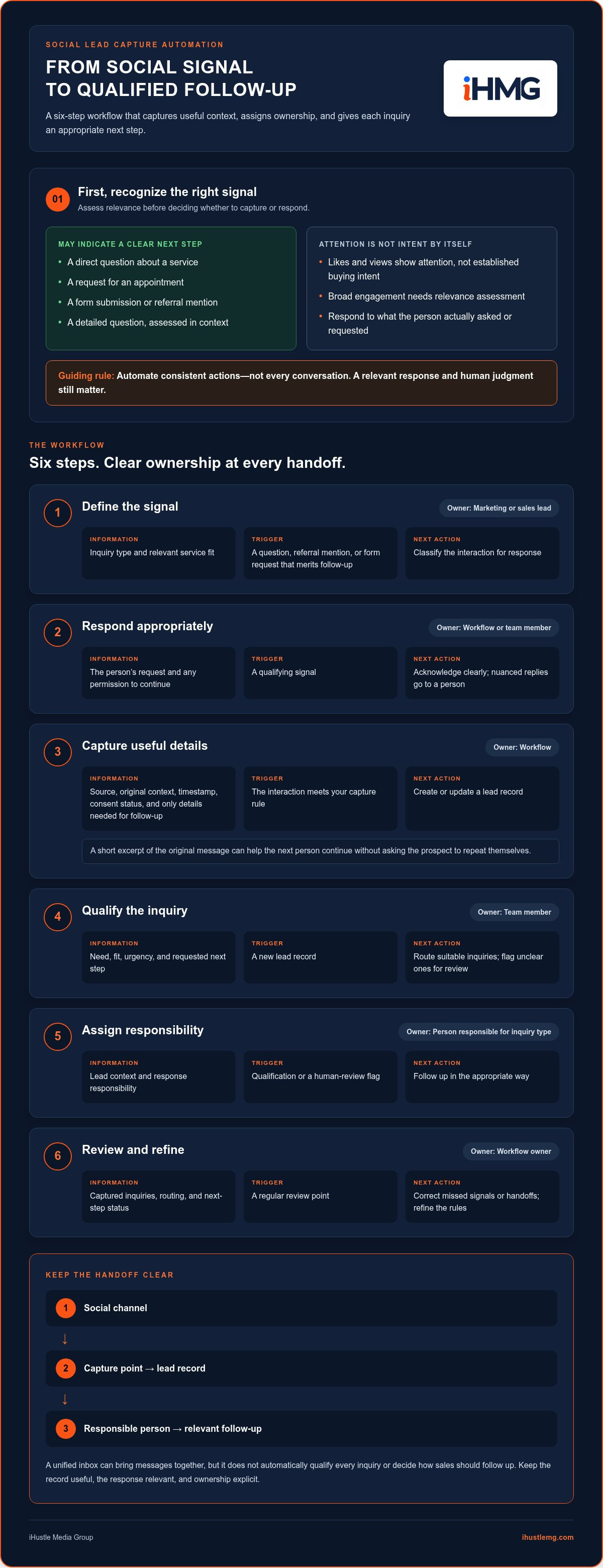
Look for context, not just activity. A direct question about a service, a request for an appointment, or a form submission may indicate a clear next step. A comment asking whether a service covers a particular area offers more context than a like or view. A referral mention may also deserve a thoughtful response. Even a detailed question, however, needs context before it becomes a qualified opportunity.
Reactions and broad engagement can indicate attention, but they don’t establish buying intent on their own. Treat each interaction as a reason to assess relevance, not as permission to send an automated sales pitch. The response should match what the person actually asked or requested.
How is lead capture different from social media management?
Social media management typically organizes publishing, approvals, and channel activity. Lead capture focuses on prospect context: what the person said, what they need, who should respond, and what happens next. A unified inbox can bring messages together, but it doesn’t automatically qualify every inquiry or decide how sales should follow up.
This distinction makes the workflow more than publishing with an inbox attached. For the wider path from engagement to business results, explore the social engagement to revenue blueprint.
How to build a social media lead capture automation workflow
A reliable workflow connects a signal to a next action, not just a notification. Before automating social media lead capture, decide what should happen at each handoff. Use this sequence as a practical starting point:
- Define the signal. Owner: marketing or sales lead. Information: inquiry type and relevant service fit. Trigger: a question, referral mention, or form request that merits follow-up. Next action: classify the interaction for response.
- Respond appropriately. Owner: the workflow for a simple acknowledgement, or a team member for a nuanced reply. Information: the person’s request and any permission to continue. Trigger: a qualifying signal. Next action: acknowledge clearly, without treating an automated reply as a sales conversation.
- Capture details. Owner: the workflow. Information: source, original context, timestamp, and consent status, plus only details needed for follow-up. Trigger: the interaction meets your capture rule. Next action: create or update a lead record.
- Qualify. Owner: a team member, supported by consistent criteria. Information: need, fit, urgency, and requested next step. Trigger: a new record. Next action: route suitable inquiries and flag unclear ones for review.
- Assign. Owner: the person responsible for the relevant inquiry type. Information: lead context and response responsibility. Trigger: qualification or a human-review flag. Next action: follow up in the appropriate way.
- Review. Owner: the workflow owner. Information: captured inquiries, routing, and next-step status. Trigger: a regular review point. Next action: correct missed signals or handoffs and refine the rules.
Workflow: Social channel → capture point → lead record → responsible person → relevant follow-up
What information belongs in a social lead record?
Keep the record useful, not bloated. Capture the source channel, original inquiry context, timestamp, consent status, and assigned owner where appropriate. Add only the details needed for a relevant response. A short excerpt of the original message can help the next person continue the conversation without asking the prospect to repeat themselves.
How should a captured lead move into follow-up?
Set handoff rules around inquiry type, urgency, service fit, or the next step the person requested. A straightforward request may need an acknowledgement, while a complex, sensitive, or ambiguous message should go to a person for review before a tailored reply. For what happens after capture, explore the AI sales pipeline automation blueprint. If you’re mapping this kind of lead flow for your business, Social Lead Web helps move social visibility toward qualified conversations and automated follow-up.
Which social media lead capture automation approach fits your business?
The right setup is one your team can use consistently. Choose based on how well it preserves inquiry context and gives each prospect a clear owner, not on how many tools it includes.
| Approach | Setup effort | Context retention | Routing and human review | Reporting | Operational fit |
|---|---|---|---|---|---|
| Manual capture | Low to start | Depends on consistent note-taking | Handled by whoever sees the inquiry | Often assembled manually | Small teams with simple, manageable inquiry flows |
| Inbox-led workflow | Moderate; requires clear routines | Messages stay visible, but lead details may need separate recording | Team members can review and assign messages | Can show activity, but may not track later outcomes | Teams that need shared visibility and accountable inbox ownership |
| Connected automation system | More planning and configuration | Can preserve structured details with the inquiry | Rules can direct leads while people review exceptions | Can connect capture to follow-up stages | Businesses managing multiple channels, team members, or handoffs |
When is a manual or inbox-based process enough?
A lower-volume operation may work well with a defined inbox routine and one accountable owner. The essentials are consistency: someone checks incoming inquiries, records useful context, and knows who follows up. A paid system isn’t necessary just because messages arrive. But recurring missed replies, duplicate data entry, or unclear ownership are signs to map the process and locate the breakdown.
When does connected automation add value?
Connected automation can help when several channels, team members, or follow-up stages make handoffs harder to track. Assess whether the setup retains the original inquiry, makes ownership visible, and supports human review when judgment is needed. A collection of tools that only generates more alerts isn’t a connected process. Each step should carry context and responsibility forward.
Platform features and integrations change, so review current capabilities when planning a specific configuration. The broader social media lead automation guide can help frame the strategy. Social Lead Web is designed to move social visibility toward qualified conversations and automated follow-up. Its role in your workflow depends on the gaps you need to address.
Make lead capture automation personal, useful, and local
For businesses serving St. Louis, St. Charles, St. Peters, Florissant, Hazelwood, Ferguson, and Chesterfield, a social inquiry may start with a practical question: “Do you serve my area?” or “Can I request an appointment?” Social media lead capture automation should preserve that local context and make the next step clear, rather than sending the same sales script to everyone.
Acknowledge what the person actually asked. For example: “Thanks for asking about service in St. Peters. What kind of appointment are you looking for?” If someone leaves a referral comment, recognize the referral and offer a straightforward way to continue the conversation. Keep replies concise, accurate, and easy to answer.
How can automation avoid sounding like spam?
Make every automated response a direct continuation of the person’s action. A useful acknowledgement confirms the question and explains what happens next. Avoid unsolicited bulk messages, personalization that only pretends to know the person, and repeated follow-ups that add no relevant information.
Automation should reduce friction, not manufacture familiarity. Before describing compliance details or configuring a workflow, review the current platform policies and applicable privacy requirements for the channels and data involved.
Where should human judgment stay in the process?
Keep a person involved when an inquiry includes an objection, an unusual request, a nuanced question, or a potentially high-value opportunity. Set escalation rules so the workflow flags uncertainty instead of generating an answer, promising a result, or guessing at service details.
Respectful timing and clear ownership are part of the customer experience. The person should know who is responsible for responding, and the team should be able to see what the prospect already asked. That keeps follow-up connected rather than repetitive or abrupt.
- Service-area question: Acknowledge the location and route the inquiry for a relevant response.
- Appointment request: Confirm the request and explain the next step without implying an appointment is already booked.
- Referral comment: Respond warmly, retain the referral context, and let a team member continue the conversation.
These small choices separate useful automation from noise. The system can organize the first response and keep the inquiry moving, while a person handles the conversation that requires understanding and judgment.
Social Lead Web connects social visibility with qualified conversations and automated follow-up.
Turn social media lead capture automation into a measurable growth system
Social media lead capture automation becomes a growth system when it shows more than how much engagement a post received. Track whether inquiries are captured, assigned, qualified, and moved toward a clear next step. Start with a small set of measures your team can define and review consistently.
Which metrics show whether capture is working?
- Captured inquiries: Count relevant social inquiries recorded during the review period. This is an activity measure, not proof of sales impact.
- Response ownership: Track whether each inquiry has a named person responsible for follow-up.
- Qualification: Record which inquiries meet your agreed criteria for a potential opportunity.
- Booked next steps: Note when a qualified conversation progresses to a scheduled or otherwise agreed next action.
- Source: Preserve the channel or source that started the conversation so you can see where inquiries enter the process.
Define each measure before comparing results. Decide what counts as an inquiry, a qualified conversation, and a booked next step, then apply the same review period and rules each time. Without consistent definitions, a change in the numbers may reflect a change in counting rather than a change in the workflow. There’s no universal conversion benchmark that can diagnose your process, so establish a baseline from your own records.
Pair activity with outcomes. Captured inquiry counts show whether the capture step is working. Qualification and booked next steps show whether inquiries are progressing. Source and completed handoffs can help locate friction, so a slowdown isn’t automatically blamed on social reach.
How can a business improve the workflow over time?
Use a regular review to inspect real conversation examples. Look for broken triggers, unanswered inquiries, lost context, unclear ownership, and steps that add effort without improving the handoff. Notice message patterns that lead to useful conversations, but don’t assume one example proves a broader trend.
Then change one workflow element at a time. If inquiries arrive without an owner, adjust assignment rules and check whether ownership becomes clearer in the next review. Document the change and its intended effect. This makes improvement deliberate rather than a series of untracked tweaks. For a wider view of lead-flow design, read the lead generation system blueprint.
Social Lead Web connects social visibility with qualified conversations. See how Social Lead Web connects engagement to leads and consider how it fits into your capture and follow-up process.
Build a Lead Flow That Moves Conversations Forward
Effective social media lead capture automation does more than collect names. It connects meaningful engagement to an appropriate response, a useful lead record, clear ownership, and a next step the team can track.
Start with a workflow your team can manage consistently. Capture the context that matters, route inquiries to the right person, and keep human judgment in the loop for nuanced conversations. Then review the process regularly. Consistent definitions for captured inquiries, qualified conversations, and booked next steps help reveal where leads are progressing and where handoffs need attention.
Social Lead Web connects social visibility with qualified conversations and automated follow-up. If you need to find gaps in your wider digital processes, AI System Diagnostic evaluates your digital infrastructure to identify automation opportunities.
Explore Social Lead Web to connect social engagement with a more organized lead capture and follow-up process.
Frequently Asked Questions
What is social media lead capture automation?
Social media lead capture automation turns relevant interactions into organized follow-up. It recognizes a signal, such as a service question or form request, records useful context, and prompts an appropriate next step. The process can help a team track who asked, where the inquiry came from, and who should respond. It doesn’t make every like or comment a qualified lead, and it can’t replace human judgment about fit or sales potential.
How do you capture leads from social media automatically?
Define which interactions should trigger capture, then set a process to record the source, original inquiry, timestamp, and permission status where relevant. Route the record to an owner and use a brief acknowledgement that matches the person’s request. For a local business serving St. Louis, St. Charles, St. Peters, Florissant, Hazelwood, Ferguson, and Chesterfield, a service-area question can be routed for a relevant response instead of treated like a generic inquiry.
Can social media lead capture automation work without paid ads?
Yes. Lead capture can organize inbound interest from social interactions without relying on paid ads. A person may ask a service question, request an appointment, mention a referral, or submit a form. A defined capture process can record that inquiry and guide it to follow-up. The system helps manage the path from engagement to conversation; it doesn’t guarantee a particular number of leads or sales.
Is social media lead automation spammy?
It doesn’t have to be. Automation feels useful when it responds to an action the person actually took, acknowledges the request, and gives a clear next step. It can feel spammy when it sends unsolicited bulk messages, uses misleading personalization, or repeats follow-ups without relevant context. Keep acknowledgements concise, provide a way for a person to take over, and review applicable platform policies and privacy requirements for your process.
What information should a social media lead capture system collect?
Collect only what the team needs to respond and follow through. A practical record may include the source channel, original message or inquiry context, timestamp, consent status where relevant, and assigned owner. Add details such as the person’s stated need only when they help determine the next action. Preserving the original context helps the next team member continue the conversation without asking the person to repeat what they already shared.
How do you measure social media lead capture automation?
Track captured inquiries, assigned response ownership, qualified conversations, booked next steps, and the source of each inquiry. Define what counts as each measure and use a consistent review period before comparing results. Captured inquiry volume shows activity; qualification and booked next steps show whether conversations progress. Review unanswered leads and incomplete handoffs to locate process issues. Use your own baseline rather than assuming a universal conversion benchmark applies.
What is the difference between a social media inbox and lead capture automation?
A social media inbox brings messages into one place where a team can view and manage them. Lead capture automation adds structure around what happens next: it can preserve inquiry context, create an organized lead record, identify an owner, and prompt follow-up. An inbox may improve visibility, but it doesn’t necessarily qualify an inquiry or track its movement toward a business opportunity. The difference is message organization versus coordinated lead flow.