


Business Automation Services in Chesterfield: Costs and Planning
Automation is more than adding software. It connects repeatable tasks and existing systems so work moves with less manual effort. Business automation services in Chesterfield can help map workflows, identify where automation fits, and plan implementation. The right solution depends on the process, the systems involved, and the integration required.
It makes sense to consider costs early. But choosing a tool before understanding the workflow can add complexity instead of removing it.
This guide explains what automation solutions do, how to map processes and connect systems, and what to consider when choosing an approach. You’ll also learn which factors shape AI automation costs and how to plan implementation around business priorities, moving from scattered tasks toward practical efficiency.
Key Takeaways
- Map each workflow from start to finish to spot repeat work, delays, and handoffs before choosing what to automate.
- Plan integrations around how information should move between your existing systems, including where people need to review or correct it.
- Prioritize automation by business impact and readiness, then sequence implementation so teams can adapt without disrupting essential work.
- Compare solutions for workflow fit, integration needs, usability, and relevant security and compliance requirements.
- Estimate AI automation costs by defining the scope first: the process, system connections, and level of complexity all shape the investment.
Workflow mapping and process improvement
Automation works best when it follows a documented business process, not a guess about where time disappears. In Chesterfield, map each handoff, decision, and repeated task before choosing what process automation should handle.
Workflow Assessment and Automation Steps
Which Chesterfield companies provide business process automation and workflow consulting? Consultancies serving Chesterfield and the St. Louis area can support workflow assessment and automation planning. Compare their approaches by how they examine handoffs, exceptions, and the systems involved.
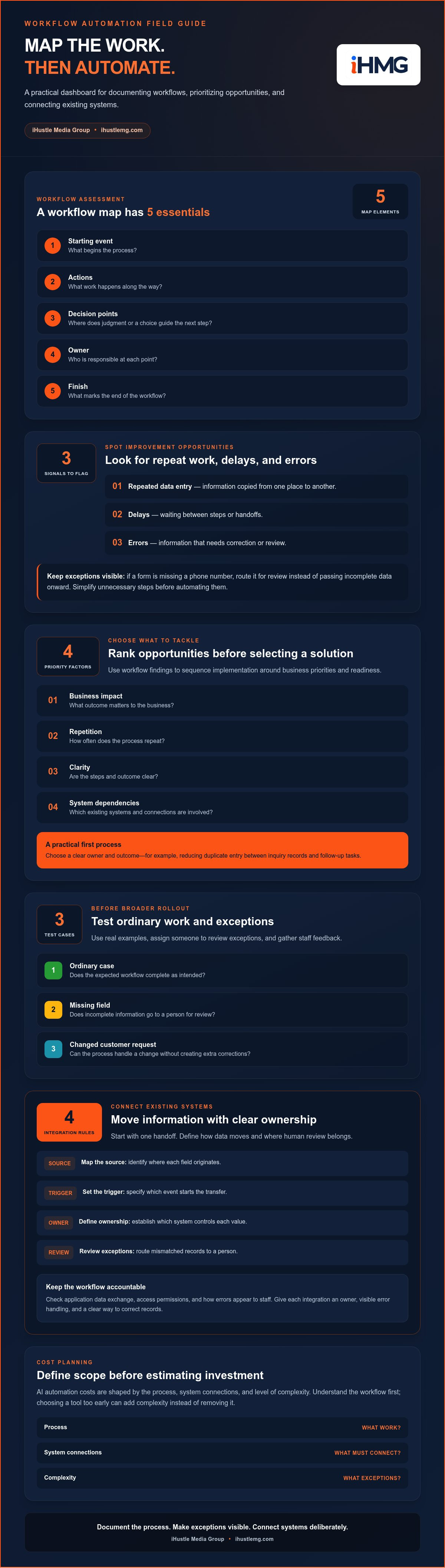
To assess and automate a workflow, define its starting event, each action, decision point, owner, and finish. Then flag repeated data entry, delays, and errors. For example, trace a customer inquiry from its first message through qualification, assignment, and follow-up. Note where information is copied and where staff make decisions that require judgment.
Keep exceptions visible. If a form lacks a phone number, route it for review rather than sending incomplete data onward. Lean Six Sigma consulting can help identify waste and root causes before automation. Simplifying an approval sequence first can prevent software from speeding up unnecessary steps.
Business Process Automation Strategy and Implementation
A business process automation strategy turns workflow findings into an implementation sequence. Rank opportunities by business impact, repetition, clarity, and system dependencies. Choose an initial process with a clear owner and outcome, such as reducing duplicate entry between inquiry records and follow-up tasks. Record current handoffs so the team can assess whether the new process works.
During implementation, test real examples before a broader rollout. Include an ordinary case, a missing field, and a changed customer request. Assign someone to review exceptions and gather staff feedback. These steps reveal whether automation supports daily work or creates extra corrections.
Are there local grants, tax incentives, or programs for business technology upgrades in Chesterfield, Missouri? Funding eligibility depends on the program, business, and proposed upgrade. Treat funding as a separate planning track, and define the workflow improvement independently so the project’s purpose stays clear.
Directories and U.S. metro comparisons can help organize market research, but a listing alone does not show whether a consultancy fits your process. For businesses in Chesterfield, St. Louis, St. Charles, St. Peters, Florissant, Hazelwood, or Ferguson, compare firms by their workflow assessment, implementation approach, and ability to address your specific handoffs. Ask how they distinguish repeatable tasks from decisions that should remain with staff.
Automation integration with existing systems
Connected automation should move information between existing tools without creating duplicate records. Start by identifying the data each system owns, then define how information passes from one operation to the next.
CRM Updates and System Integrations
CRM integration connects customer records with the workflows used to create, qualify, and follow up on leads. Identify which system holds the authoritative name, contact details, status, and next action. Then define what triggers an update, which fields move, and how staff handle missing or conflicting information. Clear rules can reduce duplicate entry without hiding errors.
For example, a new inquiry may arrive through a website form, enter a CRM, and trigger a follow-up task. Decide whether a repeat inquiry updates the existing record or creates another. Test both cases, along with incomplete contact details, before enabling the workflow for everyday operations.
- Map the source: identify where each field originates.
- Set the trigger: specify which event starts the transfer.
- Define ownership: establish which system controls each value.
- Review exceptions: route mismatched records to a person.
This sequence makes integration measurable. A CRM update is useful only when the right person receives accurate information at the right point in the process.
Integration with Business Software
Business software integration can connect scheduling, invoicing, customer records, and internal task management. Start with one handoff, such as an approved appointment creating a preparation task. Document what information is needed at each step, then decide whether it should transfer automatically or wait for staff approval.
Check how each application exchanges information, what access permissions it uses, and how errors appear to staff. Even a seamless digital workflow needs an owner, visible error handling, and a clear way to correct records. During development or configuration, test ordinary transactions and unusual cases, such as a cancelled appointment or revised invoice.
Integration planning should also account for software changes. If a team replaces its scheduling tool, review every connected workflow that depends on appointment status or customer details. An AI System Diagnostic is a relevant next step when you need to assess how AI fits across existing systems and operations.
Another integration consideration is how customers get answers outside normal office hours. AI-powered systems can answer frequently asked questions 24/7, including when an office is closed. Connect those answers to approved information and define how a question that needs human attention reaches the right staff member. Review the handoff as part of workflow testing: responses should not create conflicting customer records, and staff should be able to see what requires follow-up. Keeping the automated response and the related customer history aligned helps make this channel part of the operation rather than a separate source of information.
When planning business automation services in Chesterfield, looking at local market data helps provide realistic context for integration scale and vendor capabilities across the St. Louis metropolitan area. These regional figures offer insight into the range of company sizes and typical operational structures in the local market, not a strict measure of which integration approach will suit a particular operation. When evaluating a provider, ask how its work fits your current systems, how changes are tested, and who will handle exceptions after launch. A clear support process matters alongside the initial connection, especially when workflows or connected applications change.
Readiness, strategy, cost, and implementation planning
Readiness means the workflow, data, and people are prepared for a controlled change. Before implementation, name a process owner, identify the systems involved, and document the manual steps that currently slow operations.
Prioritize by business impact and practical readiness. For example, repeatable customer follow-up may be a stronger first project than a complex approval chain with unclear ownership. Set a baseline, define the intended efficiency gain, and decide who reviews exceptions. A sound plan also accounts for staff training and ongoing maintenance, not just initial setup.
Implementation timing depends on scope. Brewster Consulting Group says smaller business process automation projects covering one or two workflows can take 2 to 4 weeks. Broader engagements covering multiple departments or complex integrations typically take 6 to 10 weeks, according to Brewster Consulting Group. Treat those as planning references, then map dependencies, testing, and team availability into the schedule.
ERP implementation requires attention to how finance, inventory, and operational records connect. For example, if an inventory update informs purchasing decisions, test that handoff before expanding automation. Recovery planning should identify how staff can continue essential work if a system connection fails, who owns the response, and how records are reconciled afterward. CRM and ERP implementation also needs clear rules for which system owns customer, order, and billing data.
What risks, security issues, or compliance requirements should businesses consider when automating processes? Review access permissions, sensitive data flows, exception handling, and recovery procedures before launch. Check whether the selected platform meets SOC 2 requirements, applicable ISO standards, GDPR requirements, or HIPAA requirements when relevant to the process.
- Choose a defined workflow and assign its business owner.
- Record data sources, system dependencies, manual fallbacks, and approval points.
- Test common cases and exceptions in a controlled environment.
- Train affected staff, then monitor results against the baseline.
Each step reduces the risk of automating an unstable process. For a CRM and ERP rollout, test a sample transaction from customer entry through billing, then compare records and approvals. Schedule an ongoing review so teams can adapt when industry needs, software, or workflows change.
Cost planning starts with scope, not a software label. List the workflows, integrations, data cleanup, training, and support requirements that shape the work. A business process automation engagement can then be prioritized around operational value, complexity, and the resources required to maintain the system after implementation.
Workflows can be assessed alongside costs and implementation priorities. Columbus and its clients collaborate to identify and prioritize high-impact automation solutions tailored to their industries. This provides an industry-specific basis for deciding which opportunities to consider in planning.
Automation solution selection criteria
A platform should fit the workflow, not force the workflow to fit its features. Start with one documented process and compare how each option handles triggers, decisions, handoffs, and exceptions. For example, a lead-routing tool must distinguish qualified inquiries from incomplete submissions before assigning follow-up. That test reveals fit more clearly than a feature list.
Match the solution to the work’s repetition and complexity. A stable task, such as copying approved contact details into a record, may suit rule-based automation. A process involving judgment, changing inputs, and several approvals needs stronger oversight. Identify where human review remains essential, then assess whether the platform can pause, route exceptions, and record what happened.
Test the full operating path before committing. Use a representative example, such as a new inquiry that becomes a scheduled appointment. Follow its data through each connected tool, including duplicate entries, missing fields, cancellations, and corrections. Confirm that the process can recover from a failed step without silently losing information or creating conflicting records.
- Workflow fit: Can the platform handle the process’s actual steps and exceptions?
- Integration: Can it exchange the required information with existing software?
- Control: Can staff review, correct, or stop an automated action?
- Visibility: Can an owner trace activity and identify errors?
- Change capacity: Can the strategy adapt as the workflow evolves?
Security and compliance belong in the selection process, not as final-stage checks. Compare the platform’s controls with the data and obligations relevant to the workflow. Selection should include checking whether the platform meets SOC 2 requirements, applicable ISO standards, GDPR requirements, and HIPAA requirements. These are distinct benchmarks; assess each against the intended use rather than treating one as a substitute for another.
Measure operational value against a clear baseline. For example, record how staff currently handle a repetitive approval, where delays occur, and how often corrections are needed. Then define the intended improvement and who will review results. This helps distinguish measurable efficiency gains from a polished dashboard that leaves the original inefficiencies untouched.
Finally, consider the total effort required to operate the solution. Account for configuration, data cleanup, staff training, ongoing maintenance, and ownership of changes. A simple platform can become complex if it needs workarounds across several systems. Choose an option that supports the process, gives staff clear control, and keeps implementation aligned with business priorities.
AI automation service costs
AI automation costs depend on what the technology must do, which systems it connects to, and how much workflow setup is required. Use service ranges as planning benchmarks, then define your organization’s needs before comparing project scopes.
Typical setup ranges vary by solution type.
Those figures are not interchangeable quotes. A chatbot that answers a narrow set of common questions has a different scope from an AI system connected to customer records and several workflows. Likewise, CRM automation could mean a defined task sequence or a broader setup involving data cleanup, lead routing, and follow-up logic. Scope drives the comparison.
- Chatbot: define its questions, response sources, and escalation path.
- Voice agent: map the calls it handles and the actions it can take.
- CRM automation: specify triggers, records, and follow-up steps.
- Marketing automation: outline audience segments and message workflows.
- Complete system: list every included process and integration.
Before estimating costs, document the current process and intended customer experience. For example, an inquiry workflow may capture details, classify intent, and route qualified leads. The technology, existing software, and handoffs determine how tailored the setup must be. Unclear inputs or duplicate records can add preparation work before automation begins.
Separate initial setup from ongoing operating needs. List integrations, data preparation, staff training, monitoring, and maintenance as distinct scope items. A solution that streamlines one task may need less coordination than a system connecting several departments. For a specific project, price depends on scope, integrations, data preparation, and ongoing support, and is provided after a quote request.
Compare proposals by matching each included task to your workflow, not by comparing the headline alone. Ask whether testing, exception handling, and staff handover are included in the stated scope. Then compare the expected customer experience and operational impact with the work required to maintain the technology.
To clarify the scope behind an AI automation plan, map your automation requirements before selecting a solution.
IHustle Media Group: Social Lead Web
iHustle Media Group’s Social Lead Web helps turn social media engagement into qualified business opportunities. It can suit businesses whose social inquiries receive fragmented follow-up or rely on manual tracking. Rather than adding automation everywhere, focus on the handoff from engagement to a clear next step.
If you’re unsure where AI could fit across your current systems, the AI System Diagnostic can help assess the opportunity. For businesses focused on strengthening their authority, the Authority Accelerator supports that goal. Each offering addresses a distinct business need, so choose the one that aligns with the workflow or growth priority you’ve identified.
To discuss which next step fits your goals, contact iHustle Media Group.
Turn your next decision into a clear move
Automation becomes a strategic advantage when the next step has a clear owner and purpose. For businesses considering business automation services in Chesterfield, first define the change you want in your customer journey or growth strategy, then choose an approach that fits that priority.
iHustle Media Group offers Social Lead Web, AI System Diagnostic, and Authority Accelerator. Each addresses a different focus, from converting social engagement to assessing AI systems or building authority. Start with the challenge that matters most, rather than adding technology without a defined role.
If you’re ready to discuss how automation could fit your business, contact iHustle Media Group. A considered next step can turn a promising idea into a practical direction for growth.
Frequently Asked Questions
What Are Automation Solutions?
Automation solutions use software and defined rules to handle recurring business tasks, while people manage exceptions and judgment calls. For example, a service request could be classified by topic, routed to the right team, and flagged for human review if essential details are missing. The value comes from giving each action a clear purpose, not automating every task simply because technology can perform it.
What business automation services are available in Chesterfield, Missouri?
In Chesterfield, iHustle Media Group offers Social Lead Web, AI System Diagnostic, and Authority Accelerator. Social Lead Web connects social engagement with qualified business opportunities; the diagnostic evaluates digital infrastructure to identify AI opportunities. These offerings serve businesses in Chesterfield and nearby St. Louis, St. Charles, St. Peters, Florissant, Hazelwood, and Ferguson. They focus on lead generation and authority building, rather than general-purpose software development.
What types of business processes can automation services handle?
Automation can support repeatable administrative and customer-facing work, such as appointment reminders, document routing, invoice notifications, and inventory alerts. A property service business, for example, could route a completed job record to billing and notify staff when a required field is missing. Tasks involving changing context or sensitive decisions should retain a human review step, so efficiency doesn’t come at the expense of accuracy.
What software and platforms do local business automation consultants implement?
Business automation can involve CRM, scheduling, billing, email, and customer-support platforms connected according to workflow needs. The specific software varies by organization, so start by defining what information must move and where it belongs. iHustle Media Group’s AI System Diagnostic evaluates existing digital infrastructure to identify automation opportunities and clarify where current systems can support improved lead flow and operations.
How can a small business choose a business automation provider in Chesterfield?
Choose based on the business outcome you need, such as improving lead capture, follow-up, or market authority. Bring a real example, like an inquiry that receives no timely next step, and assess whether the approach addresses that gap. For lead conversion, Social Lead Web connects social engagement with qualified opportunities. If your priority is assessing AI opportunities across existing systems, consider an AI System Diagnostic.
How do Chesterfield automation providers compare by services, pricing, and reviews?
Compare providers by their workflow assessment, implementation approach, and ability to address your specific handoffs. Costs depend on the process, system connections, and level of complexity.